
• Skip to primary navigation
  • Skip to main content
  • Skip to primary sidebar
Children's Medical Center

Children's Medical Center

Denver Pediatric Practice

  • About
    • Pediatricians
      • Dr. Abby
      • Dr. Debbie
      • Dr. Erin
      • Dr. Katie
      • Dr. Lauren
      • Dr. Lisa
      • Dr. Liz
      • Dr. Spero
    • Pediatric Services
      • Mental Health Services
      • Breastfeeding Support
      • Administration
    • News
    • Newsletter Sign-up
  • Resources
    • Patient Account
      • Forms
      • Online Bill Pay
      • MyChart Login
      • Using MyChart
    • Financial Information
      • Affordable Care Act
      • Service Costs
      • Online Payment
    • Medical Privacy Policy
    • Parent Education
      • Breastfeeding
      • Newborns
      • Parenting Tips
      • Safety
      • Special Needs Children
      • Teens
      • Vaccinations
      • What’s Going Around?
    • Medicine & Dosages
    • Symptom Guide
    • CMC Pediatrician Blog
  • Appointments
    • Sick Visit
    • Well Visit
  • New Patients
    • New Baby
    • Transfer to CMC
  • Contact
    • Phone System Guide
    • Parking at CMC
  • My Chart
Home/Resources/Using MyChart/How to Request a Release of Records from Children’s Medical Center

How to Request a Release of Records from Children’s Medical Center

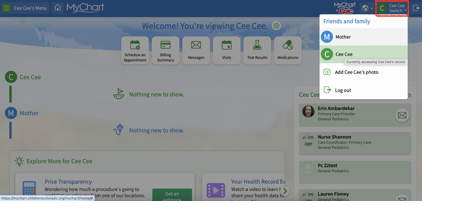
  1. Make sure you are in the patient’s MyChart page, NOT the parent/guardian’s. You can toggle between the two pages from the top right corner on both website and phone.
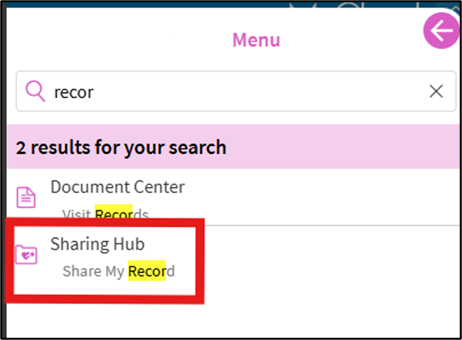
2. Select the menu button ( 3 horizontal lines) at the top left corner. In the search the menu field type “records” and select Sharing Hub.
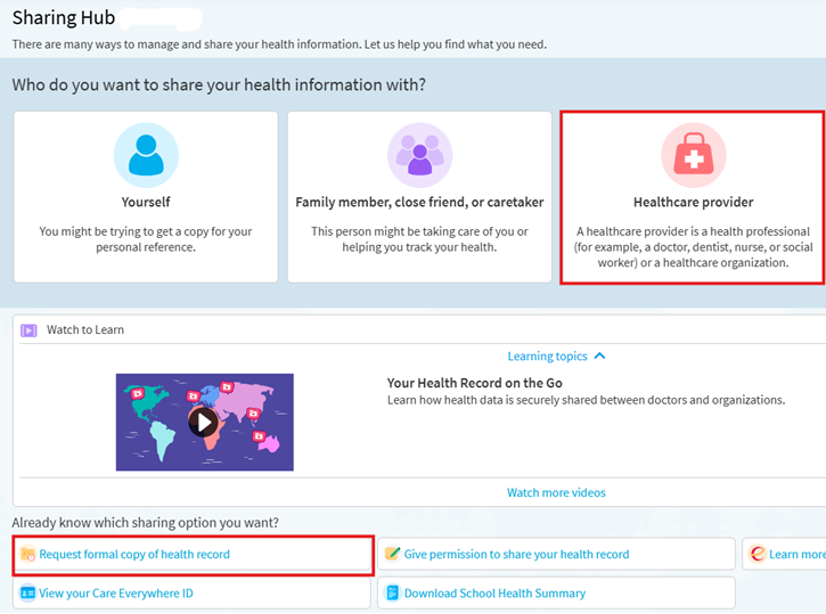
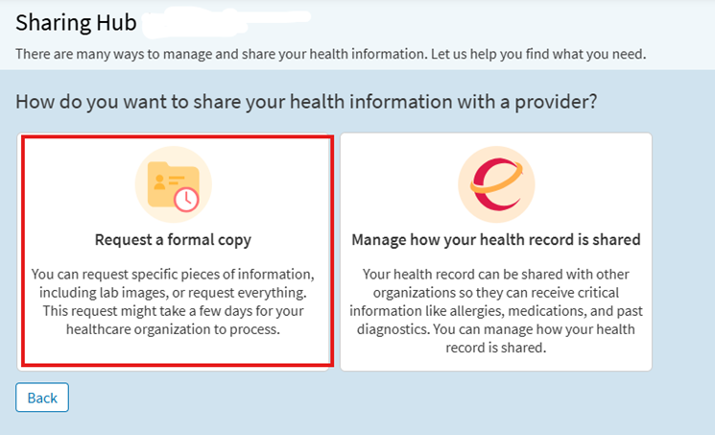
3. On the sharing hub main page, select “request formal copy of health record.” You can also get to the next step by selecting the healthcare provider box, and on the next screen select “request a formal copy.”
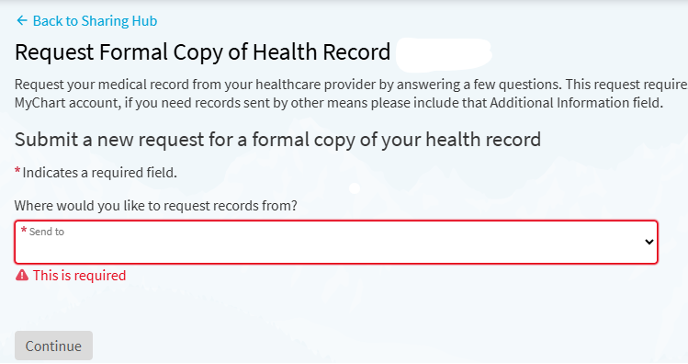
4. To begin the process of requesting records, you will select the location that you are requesting records from (ie select Children’s Medical Center to request records from our office).
5. Once you select the location, you will be prompted to fill out the required information to indicate where your records should be sent and what information should be included.
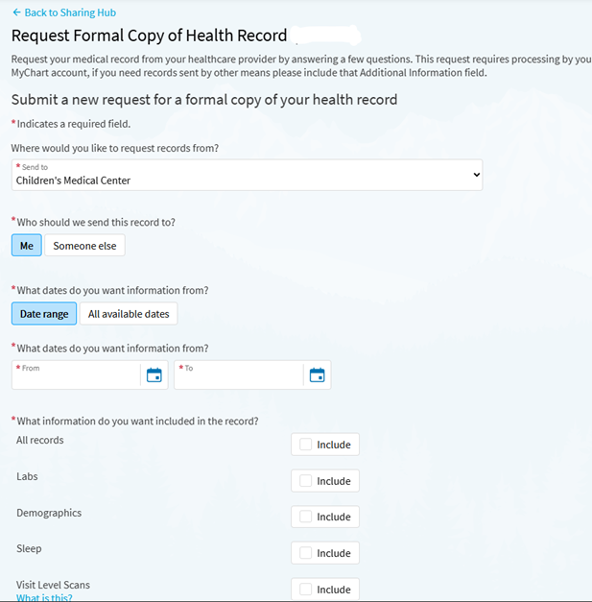
6. You will then select “continue” and be taken to the next page where you must click that you agree to the consent for release of information. Then select “send request”.

7. To complete the process you will be directed to the end of the request and will need to select “set up notifications” to be notified once those records are available.

Primary Sidebar

Call Children’s Medical Center

303-830-7337
Monday-Friday:
8:00am to 12:30pm &
1:30pm to 5:00pm

Saturday:
8:00am to 12:00noon

Phone system guide

Our Office Location

Children's Medical Center is located just east of downtown Denver at:

1818 N. Ogden Street
Suite 300
Denver, CO 80218

Parking & location

Recent News

Dr. Lauren Mickey

Poop Problems? Here’s How to Help Your Child Go

Constipation is such a common thing for kids. And if you’ve ever had a constipated kiddo you know it …

Continue Reading about Poop Problems? Here’s How to Help Your Child Go

Search our site

Explore more

Online Bill PayMyChart LoginContact Us
Children's Medical Center

Footer

Children’s Medical Center

1818 N. Ogden Street, Suite 300
Denver, CO 80218
303-830-7337

Copyright © 2026 · Children's Medical Center

  • Contact Us
  • Disclaimer
  • Privacy Policy