
The most important first step is to ensure that you are in the patient’s MyChart page, NOT the parent/guardian’s. You can toggle between the two pages from the top right corner.
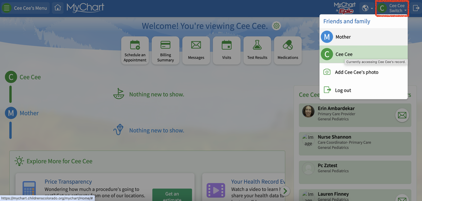
Navigate to the Medications page from the home page by selecting Medications from the menu or from the quick links at the top of the page.


Select “request refill” under any medication. You will then be presented with a list of all medications eligible for refill. Select all the medications you need to refill from this list.

Select “Next.” Then on the next page make sure that your preferred pharmacy is selected then hit “Next” again. On this final page confirm all details are correct and include any desired comments you’d like to share with us about the refill request, then select “Submit.”